Transitioning to a Hybrid Work Model Successfully
A comprehensive guide to making a smooth and successful transition to a hybrid work model.
A comprehensive guide to making a smooth and successful transition to a hybrid work model.
Transitioning to a Hybrid Work Model Successfully
Understanding the Hybrid Work Landscape
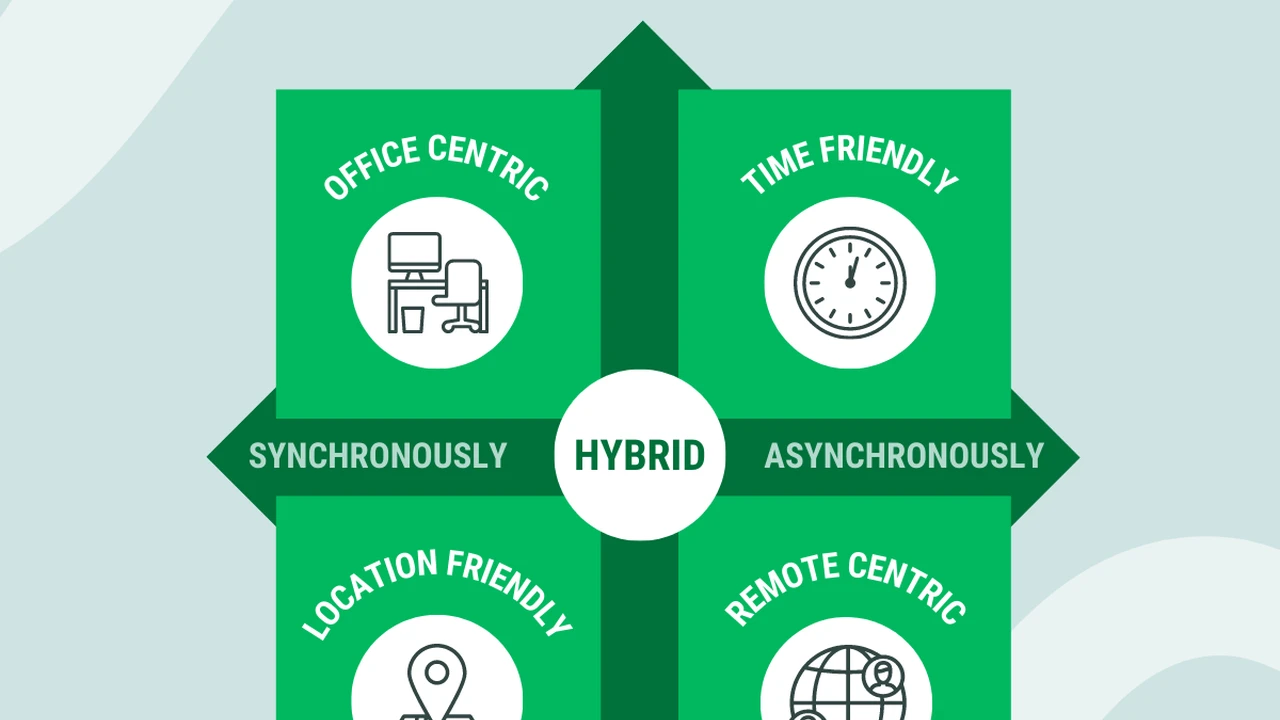
Hey there! So, the world of work has really shifted, hasn't it? For many of us, the traditional office setup feels like a distant memory, and fully remote work, while great for some, isn't always the perfect fit for everyone or every company. That's where the hybrid work model steps in – it's like the best of both worlds, blending in-office collaboration with the flexibility of working from home. But here's the thing: making this switch isn't just about deciding who comes in when. It's a whole new ballgame that requires careful planning, the right tools, and a mindset shift for everyone involved. We're talking about creating a system where people can be productive, connected, and happy, whether they're at their kitchen table or in a conference room.
The core idea behind hybrid work is flexibility. It acknowledges that different tasks, different teams, and different individuals thrive in different environments. Some days, you might need the buzz of the office for brainstorming sessions or team meetings. Other days, deep focus work is best done in the quiet comfort of your home. The challenge, and the opportunity, lies in finding that sweet spot. It's about empowering employees to choose where and how they work best, while still fostering a strong company culture and ensuring seamless collaboration. This isn't just a temporary fix; it's becoming the new normal for many organizations, and getting it right can be a huge competitive advantage.
Key Pillars for a Smooth Hybrid Transition
Communication Strategies for Hybrid Teams
Alright, let's talk communication. In a hybrid setup, this isn't just important; it's absolutely critical. When some folks are in the office and others are remote, you can't rely on hallway conversations or impromptu desk chats. You need a deliberate, inclusive communication strategy. This means making sure everyone, regardless of their location, has access to the same information, feels heard, and can contribute effectively. Think about it: if half your team is laughing at an inside joke in the office, and the remote half has no idea what's going on, that's a recipe for disconnection.
One of the biggest mistakes companies make is assuming that just because people can communicate, they will communicate effectively in a hybrid environment. You need to set clear expectations about communication channels. When should you use instant messaging? When is email appropriate? When is a video call necessary? And perhaps most importantly, how do you ensure that remote participants in meetings are just as engaged and visible as those in the room? This often means investing in good technology and establishing meeting etiquette that prioritizes inclusivity. For example, if someone is presenting from home, make sure their video and audio are crystal clear. If you're in a meeting room, ensure the camera captures everyone, and that remote attendees can hear all in-room participants clearly.
Technology Essentials for Hybrid Work Success
Speaking of technology, this is where the rubber meets the road for hybrid work. You can't have a successful hybrid model without the right tools. We're talking about a suite of applications and hardware that supports seamless collaboration, communication, and productivity, no matter where your team is located. This isn't just about having Zoom; it's about an integrated ecosystem that makes working together feel effortless.
Let's break down some of the must-haves:
Video Conferencing Platforms for Seamless Meetings
This is probably the most obvious one, but it's also the most crucial. You need a robust video conferencing platform that offers stable connections, good audio and video quality, and features that support hybrid meetings. Think screen sharing, virtual whiteboards, and breakout rooms. Here are a few top contenders:
- Zoom Meetings: Still the king for many. It's user-friendly, reliable, and offers a ton of features like virtual backgrounds, robust screen sharing, and excellent breakout rooms. It integrates well with calendars and other tools. For a basic plan, it's free for up to 40-minute meetings. Paid plans start around $14.99/month per user for Pro, offering longer meetings and more features. It's great for its ease of use and widespread adoption, meaning most people are already familiar with it.
- Microsoft Teams: If your company is already heavily invested in the Microsoft 365 ecosystem, Teams is a no-brainer. It combines chat, video calls, file sharing, and app integration all in one place. It's particularly strong for internal collaboration and document co-editing. Pricing is usually bundled with Microsoft 365 subscriptions, starting from around $6.00/month per user for Microsoft 365 Business Basic. Its strength lies in its integration with other Microsoft products like Word, Excel, and SharePoint, making document collaboration incredibly smooth.
- Google Meet: Part of Google Workspace, Meet is super easy to use, especially if your team uses Gmail and Google Calendar. It's reliable and offers good integration with other Google apps. Free for basic use, with Google Workspace Business Starter plans starting at $6.00/month per user. Its simplicity and integration with Google's suite make it a strong contender for teams already using Google products.
When choosing, consider your existing tech stack, ease of use for your team, and specific features like transcription or recording capabilities.
Collaboration and Project Management Tools
Beyond just talking, hybrid teams need to work together on projects. This requires tools that allow for shared workspaces, task tracking, and document collaboration. These tools ensure everyone knows what's happening, who's doing what, and what the deadlines are.
- Slack: The go-to for instant messaging and channel-based communication. It's fantastic for quick questions, team updates, and reducing email clutter. It integrates with almost everything. Free for basic use, paid plans start around $7.25/month per user for Pro. Its strength is its real-time communication and extensive integration capabilities, making it a central hub for team discussions.
- Asana: A powerful project management tool that helps teams organize, track, and manage their work. You can create tasks, assign them, set deadlines, and visualize progress. Free for small teams, paid plans start around $10.99/month per user for Premium. It's excellent for visualizing workflows and ensuring tasks don't fall through the cracks, especially for complex projects.
- Miro: A fantastic online whiteboard for brainstorming, workshops, and visual collaboration. It's like having an infinite whiteboard that everyone can contribute to, no matter where they are. Free for basic use, paid plans start around $10/month per user for Team. It's invaluable for creative sessions, strategy planning, and any activity that benefits from visual interaction.
- Notion: A versatile workspace that combines notes, databases, wikis, project management, and more. It's highly customizable and can be adapted to almost any team's needs. Free for personal use, team plans start around $8/month per user for Plus. Its flexibility makes it a powerful tool for centralizing information and workflows.
The key here is to pick tools that your team will actually use and that integrate well with each other. Don't overwhelm your team with too many different platforms.
Hardware for the Hybrid Office and Home Setup
It's not just about software; the right hardware makes a huge difference. For those in the office, you need meeting rooms equipped for hybrid calls. For those at home, a good setup can prevent frustration and boost productivity.
-
For Meeting Rooms:
- Logitech Rally Bar: This is an all-in-one video bar designed for medium to large meeting rooms. It includes a camera with AI features (like auto-framing), speakers, and microphones. It's easy to set up and integrates with Zoom, Teams, and Google Meet. Price: Around $3,999.00. It's a premium solution that ensures high-quality audio and video for all participants, both in-room and remote.
- Poly Studio X30: Another excellent all-in-one video bar for smaller rooms. It offers great audio and video, and is simple to deploy. Price: Around $1,699.00. A more affordable option for smaller spaces that still delivers a professional meeting experience.
- Owl Labs Meeting Owl 3: This unique 360-degree camera and speaker system sits in the center of the table and automatically focuses on whoever is speaking. It's fantastic for making remote participants feel more included. Price: Around $1,049.00. Its unique perspective helps bridge the gap between in-room and remote attendees, making meetings more engaging for everyone.
-
For Home Offices:
- Good Quality Webcam (e.g., Logitech C920s Pro HD Webcam): Essential for clear video calls. Price: Around $69.99. A significant upgrade from built-in laptop cameras, ensuring you look professional on calls.
- Noise-Cancelling Headphones (e.g., Sony WH-1000XM5 or Bose QuietComfort 45): Crucial for focus and clear audio in noisy home environments. Sony WH-1000XM5 Price: Around $399.99. Bose QuietComfort 45 Price: Around $279.00. These are game-changers for maintaining focus and participating clearly in calls without background distractions.
- Ergonomic Chair and Desk: While not strictly tech, a comfortable and ergonomic setup prevents strain and boosts long-term productivity. Prices vary widely, from a few hundred to over a thousand dollars. Investing in ergonomics is investing in employee well-being and sustained productivity.
Providing a budget or even specific recommendations for home office setups can go a long way in supporting your remote workforce.
Culture and Employee Experience in a Hybrid World
This is perhaps the trickiest part: maintaining and evolving your company culture in a hybrid environment. It's easy for remote employees to feel disconnected or for in-office teams to form cliques. You need to be intentional about fostering inclusion and a sense of belonging for everyone.
Think about how you celebrate successes, how you onboard new employees, and how you encourage informal interactions. Virtual coffee breaks, online team-building games, and hybrid social events can help. It's also about leadership modeling the right behavior – if leaders only interact with those in the office, remote employees will notice. Encourage managers to check in regularly with remote team members and ensure they have equal opportunities for growth and visibility.
Another crucial aspect is fairness. Ensure that performance reviews, promotion opportunities, and access to resources are equitable for both in-office and remote employees. Avoid proximity bias, where those physically present are inadvertently favored. This requires clear policies and a conscious effort from management.
Challenges and Solutions in Hybrid Work Implementation
Addressing Proximity Bias and Ensuring Equity
Proximity bias is a real thing. It's the unconscious tendency to favor people who are physically closer to you. In a hybrid model, this can mean in-office employees get more face time with managers, more informal learning opportunities, and are top-of-mind for new projects or promotions. To combat this, you need to be proactive.
Solutions include:
- Structured Check-ins: Implement regular, scheduled one-on-one meetings with all team members, regardless of location.
- Inclusive Meeting Practices: Always default to video calls, even if everyone is in the office. Ensure remote participants are actively engaged and given equal speaking opportunities.
- Transparent Communication: Share important updates and decisions through accessible digital channels, not just in-person conversations.
- Performance Metrics: Focus on outcomes and results, rather than hours spent in the office.
- Development Opportunities: Ensure training, mentorship, and career development opportunities are equally available and promoted to both remote and in-office staff.
Managing Schedules and Collaboration Overlap
One of the biggest logistical headaches in hybrid work is coordinating schedules. When should people come into the office? How do you ensure enough overlap for collaborative work without forcing unnecessary commutes? Some companies opt for 'anchor days' where everyone is expected in the office, while others leave it more flexible.
Solutions:
- Clear Guidelines: Establish clear guidelines on office attendance expectations. Is it 2 days a week? Specific days? Be transparent.
- Shared Calendars: Encourage the use of shared calendars that indicate when people are in the office or working remotely.
- Core Collaboration Hours: Define specific hours during the day when all team members are expected to be online and available for collaboration, accommodating different time zones if necessary.
- Flexible Meeting Times: When scheduling meetings, consider the time zones and preferred working hours of all participants.
Ensuring Data Security and Compliance
When employees are working from various locations, data security becomes even more complex. Company data needs to be protected whether it's accessed from an office network or a home Wi-Fi connection. This is non-negotiable.
Solutions:
- VPN (Virtual Private Network): Mandate the use of a VPN for accessing company resources from outside the office network.
- Multi-Factor Authentication (MFA): Implement MFA for all company accounts and applications.
- Endpoint Security: Ensure all company-issued devices have up-to-date antivirus software and endpoint detection and response (EDR) solutions.
- Regular Training: Conduct regular cybersecurity awareness training for all employees, emphasizing best practices for remote work.
- Secure Cloud Storage: Utilize secure, enterprise-grade cloud storage solutions for all company documents and data.
Measuring Success and Iterating Your Hybrid Model
Feedback Mechanisms for Continuous Improvement
A hybrid model isn't a set-it-and-forget-it kind of deal. It needs to evolve. The best way to ensure it's working is to regularly gather feedback from your employees. What's working well? What's causing friction? Are people feeling connected? Are they productive?
Implement regular surveys, conduct focus groups, and encourage open dialogue. Create channels where employees can provide anonymous feedback. This data is invaluable for identifying pain points and making necessary adjustments. Remember, what works for one team might not work for another, so be prepared for some level of customization.
Key Performance Indicators for Hybrid Productivity
How do you know if your hybrid model is actually boosting productivity and not hindering it? You need to define clear KPIs. These shouldn't just be about hours worked, but about outcomes and impact. Look at project completion rates, quality of work, employee engagement scores, retention rates, and even things like meeting effectiveness.
It's also important to track employee well-being. Are people feeling more stressed or less stressed? Is work-life balance improving or deteriorating? Use these metrics to inform your decisions and refine your hybrid strategy. The goal is to create a sustainable model that benefits both the company and its people.
Adapting Policies and Practices Over Time
The world changes, and so should your hybrid work model. Be prepared to adapt your policies and practices based on feedback, new technologies, and evolving business needs. This might mean adjusting office days, investing in new tools, or refining your communication guidelines. Treat your hybrid model as a living document, constantly open to improvement.
The most successful hybrid transitions are those that are approached with an experimental mindset. Start with a clear vision, implement with care, measure diligently, and be ready to iterate. It's a journey, not a destination, and with the right approach, your company can truly thrive in this flexible new world of work.
:max_bytes(150000):strip_icc()/277019-baked-pork-chops-with-cream-of-mushroom-soup-DDMFS-beauty-4x3-BG-7505-5762b731cf30447d9cbbbbbf387beafa.jpg)