{ "article": [ { "title": "The Role of Ergonomics in Workplace Health", "meta_description": "Explore the importance of ergonomics in creating a healthy and productive work environment.", "content": "Explore the importance of ergonomics in creating a healthy and productive work environment. Ergonomics isn't just a buzzword; it's a fundamental approach to designing your workspace to fit you, rather than forcing you to fit your workspace. This proactive strategy significantly impacts your physical health, mental well-being, and overall productivity. When your environment supports your natural posture and movements, you reduce the risk of musculoskeletal disorders, eye strain, and fatigue, leading to a more comfortable and efficient workday.\n\n
\n\n
Understanding Ergonomics What It Means for You
\n\nErgonomics is the science of designing and arranging things people use so that the people and things interact most efficiently and safely. In the context of the workplace, this means optimizing your desk, chair, monitor, keyboard, and mouse to promote good posture, reduce repetitive strain, and minimize discomfort. Think of it as tailoring your work environment to your unique body and work habits. This isn't a one-size-fits-all solution; what works for one person might not work for another. The goal is to create a dynamic and supportive setup that allows you to work comfortably for extended periods.\n\n
Why Ergonomics Matters Your Health and Productivity
\n\nIgnoring ergonomics can lead to a host of problems. Prolonged poor posture can result in chronic back pain, neck stiffness, carpal tunnel syndrome, and even headaches. These physical ailments not only cause discomfort but also significantly impact your concentration and productivity. When you're constantly shifting to find a comfortable position or battling pain, your focus on tasks diminishes. Conversely, a well-designed ergonomic setup can boost your energy levels, improve your mood, and enhance your ability to concentrate, ultimately leading to higher quality work and fewer sick days.\n\n
Key Ergonomic Principles for a Better Workspace
\n\nAchieving an ergonomic workspace involves several key principles:\n\n
Chair Setup The Foundation of Comfort
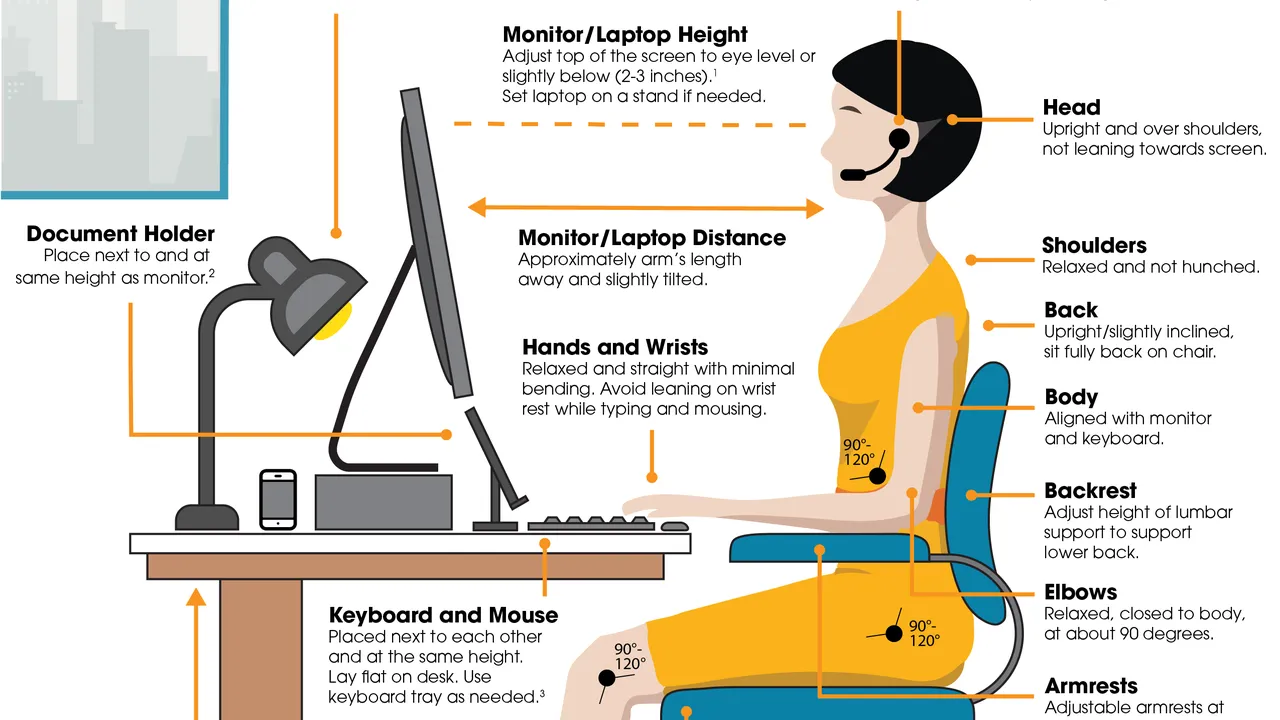
\n\nYour office chair is arguably the most critical piece of ergonomic equipment. A good ergonomic chair should provide lumbar support, adjustable height, armrests, and a reclining feature. When sitting, your feet should be flat on the floor or a footrest, your knees at a 90-degree angle, and your hips slightly higher than your knees. The backrest should support the natural curve of your spine, and armrests should allow your shoulders to relax.\n\n
Monitor Placement Eye Strain Prevention
\n\nProper monitor placement is crucial for preventing eye strain and neck pain. Your monitor should be at arm's length, with the top of the screen at or slightly below eye level. This ensures your neck remains in a neutral position. If you use multiple monitors, arrange them to minimize head and neck rotation. Consider an adjustable monitor arm for optimal flexibility.\n\n
Keyboard and Mouse Positioning Wrist and Shoulder Health
\n\nYour keyboard and mouse should be positioned close to your body to avoid reaching, which can strain your shoulders and wrists. Your wrists should remain straight and neutral, not bent up or down. An ergonomic keyboard with a slight negative tilt or a split design can help. For your mouse, consider a vertical mouse or a trackball to reduce wrist pronation and repetitive movements.\n\n
Desk Height and Workspace Organization Workflow Efficiency
\n\nAn adjustable-height desk, or standing desk, offers the flexibility to alternate between sitting and standing, which is highly beneficial for circulation and reducing sedentary behavior. Regardless of desk type, ensure your primary work tools are within easy reach. Clutter-free workspaces also contribute to mental clarity and focus.\n\n
Lighting and Environment Overall Well-being
\n\nGood lighting is essential to prevent eye strain. Natural light is ideal, but if not available, use diffused, glare-free lighting. Minimize screen glare by positioning your monitor away from direct light sources. Maintaining a comfortable room temperature and ensuring good air quality also contribute to overall well-being and productivity.\n\n
Recommended Ergonomic Products and Their Benefits
\n\nInvesting in ergonomic products can make a significant difference. Here are some top recommendations, their use cases, comparisons, and approximate pricing:\n\n
Ergonomic Chairs
\n\n* Herman Miller Aeron Chair: Often considered the gold standard, the Aeron offers exceptional lumbar support, breathable Pellicle mesh, and extensive adjustability. It's ideal for long hours of sitting and comes in various sizes.
* Use Case: Professionals spending 8+ hours daily at their desk.
* Comparison: Superior adjustability and durability compared to most office chairs. Its unique PostureFit SL support system is a standout.
* Price: ~$1,500 - $2,000 USD.
* Steelcase Gesture Chair: Designed to support a wide range of postures and technologies, the Gesture is highly adaptable. Its armrests move like the human arm, offering unparalleled support for various devices.
* Use Case: Users who frequently switch between devices (laptop, tablet, phone) or adopt varied postures.
* Comparison: More adaptable armrests than the Aeron, better for multi-device users.
* Price: ~$1,200 - $1,800 USD.
* Ergohuman High Back Swivel Chair: A more budget-friendly option that still offers excellent ergonomic features, including lumbar support, headrest, and adjustable arms.
* Use Case: Individuals seeking good ergonomic support without the premium price tag.
* Comparison: Offers similar core adjustments to high-end chairs but with less refined materials and slightly less durability.
* Price: ~$600 - $900 USD.\n\n
Adjustable Standing Desks
\n\n* Fully Jarvis Standing Desk: A popular choice known for its sturdy frame, smooth motor, and wide range of desktop options. It allows seamless transitions between sitting and standing.
* Use Case: Anyone looking to incorporate more movement into their workday and reduce sedentary time.
* Comparison: Offers a wide range of customization options for desktop materials and sizes. Generally more stable than cheaper alternatives.
* Price: ~$500 - $1,000 USD (depending on size and features).
* Uplift V2 Standing Desk: Another highly-rated option with excellent stability, a wide height range, and numerous accessory options.
* Use Case: Users who prioritize stability and a broad selection of desk accessories (monitor arms, keyboard trays).
* Comparison: Often praised for its stability at higher heights and extensive accessory ecosystem.
* Price: ~$600 - $1,200 USD.\n\n
Ergonomic Keyboards and Mice
\n\n* Microsoft Sculpt Ergonomic Desktop: A split keyboard and separate dome-shaped mouse designed to promote a natural wrist and forearm posture.
* Use Case: Users experiencing wrist discomfort or looking to prevent carpal tunnel syndrome.
* Comparison: Integrated numeric keypad in a separate unit, which some users prefer for flexibility.
* Price: ~$80 - $120 USD.
* Logitech MX Vertical Ergonomic Mouse: A vertical mouse that positions your hand in a natural handshake posture, reducing forearm pronation.
* Use Case: Individuals with wrist pain or those looking to reduce strain from traditional mouse use.
* Comparison: Offers a more natural hand position than traditional mice, but takes some getting used to.
* Price: ~$80 - $100 USD.
* Kinesis Freestyle Edge RGB Split Mechanical Keyboard: A highly customizable split keyboard that allows users to separate the two halves to achieve optimal shoulder and wrist alignment.
* Use Case: Gamers and typists who need extreme customization and ergonomic separation.
* Comparison: Offers mechanical switches and advanced programmability, making it a premium choice for serious users.
* Price: ~$200 - $250 USD.\n\n
Monitor Arms and Risers
\n\n* Ergotron LX Desk Monitor Arm: A highly durable and adjustable monitor arm that allows for precise positioning of your screen.
* Use Case: Users who need flexibility in monitor height, depth, and angle, especially with standing desks.
* Comparison: Known for its robust build quality and smooth articulation compared to cheaper arms.
* Price: ~$150 - $200 USD.
* VIVO Single LCD Monitor Desk Mount Stand: A more budget-friendly option for single monitor setups, offering basic height and tilt adjustments.
* Use Case: Basic monitor elevation and tilt for fixed desk setups.
* Comparison: Less flexible and robust than premium arms, but sufficient for basic ergonomic needs.
* Price: ~$30 - $50 USD.\n\n
Footrests
\n\n* Fellowes I-Spire Series Adjustable Foot Rest: Provides adjustable tilt and height to support proper leg and foot positioning.
* Use Case: Individuals whose feet don't comfortably reach the floor when sitting.
* Comparison: Simple yet effective, helps maintain proper knee and hip angles.
* Price: ~$30 - $50 USD.\n\n
Implementing Ergonomics Practical Steps for Your Workspace
\n\nImplementing ergonomic principles doesn't have to be an overnight overhaul. Start with small, manageable changes. Begin by assessing your current setup. Are you slouching? Is your neck craned? Are your wrists bent? Once you identify problem areas, you can prioritize adjustments or purchases. Remember to take regular breaks, stretch, and move around throughout the day, even with the most perfect ergonomic setup. Dynamic movement is key to preventing stiffness and promoting circulation. Listen to your body; if something feels uncomfortable, adjust it. Your well-being is your most valuable asset in the workplace.\n\n
The Long-Term Benefits of an Ergonomic Workplace Investment in Your Future
\n\nInvesting in ergonomics is an investment in your long-term health and career longevity. By preventing injuries and reducing discomfort, you're not only improving your daily work experience but also safeguarding your ability to work effectively for years to come. Companies that prioritize ergonomics often see reduced absenteeism, increased employee morale, and higher productivity. For individuals, it means less pain, more energy, and a greater capacity to focus on what truly matters in their professional lives. Make ergonomics a priority, and feel the difference it makes."
}
]
}
:max_bytes(150000):strip_icc()/277019-baked-pork-chops-with-cream-of-mushroom-soup-DDMFS-beauty-4x3-BG-7505-5762b731cf30447d9cbbbbbf387beafa.jpg)